
Deploying a NextJS Application as a Static Site on GitHub Pages
Let us start with the problem. I have a simple Next JS Application. I want it deployed as a static site. The deployment platform should be free for life and it should support CICD.
Okay, now let me show you how to use Github pages to check all these boxes.
Introduction
Before we start, I'm assuming you already have your code, working locally and pushed to github. Note that the repository must be publicly visible. To deploy from a private repository, you will be required to upgrade your subscription.
Setup Github Pages
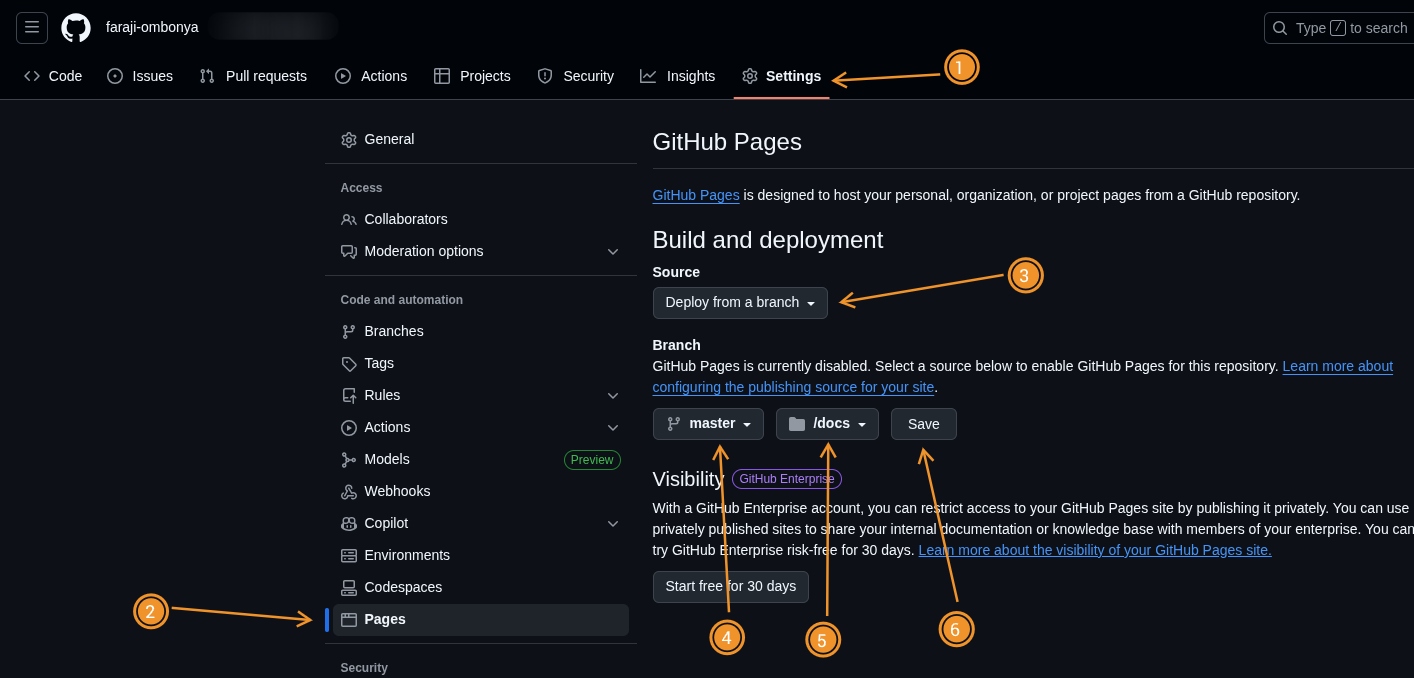
- Go to the repository settings tab.
- Click on the Pages tab to open the Github pages settings.
- Select the source, deploy from a branch
- select the branch and source folder, we have two options either root or docs. We will go with docs.
- Save
Setup NextJS
-
Next, update your Next js config file to output the export to the docs folder we pointed to earlier.
next.config.jsimport type { NextConfig } from "next"; const nextConfig: NextConfig = { output: "export", distDir: "docs", basePath: "/repo-name", assetPrefix: "/repo-name", }; export default nextConfig; -
Run
npm run buildcommand to build and export the project to the specifieddistDir. In our case, thedistDirwill bedocs. -
Add a
.nojekyllfile at the root of the deployment directory, in our case, thedocsdirectory. -
Add, commit and push.
Notes
Rebuilding the application deletes the .nojekyll file in the docs folder. So,
remeber to create it after building.
Also, I'm not sure if adding the .nojekyll file every time you rebuild is the
best approach, if you find a better approach, please leave a comment below
this post on X
describing your solution.